- Get smarter about Online Side Hustle Secrets
- Posts
- These brutal truths can change your results ...
These brutal truths can change your results ...
How to Boost YOUR Traffic 💵 - UNLIMITED high quality images - Affiliate Empire...

Hello Gem Seekers !
Welcome to the new Gem Seekers who have joined us since last Friday !
Every Friday at Tech Agility Hub, we delve into the realm of online possibilities, revealing valuable insights and innovative tactics to enhance your earnings and efficiency. Our newsletter serves as your essential guide, featuring everything from specialized business concepts to insider advice that can elevate your side ventures, ensuring you thrive in the digital arena.
If you aren’t subscribed yet, join smart, curious, and hungry folks by subscribing here.
So, get ready to dive right in, and let’s see what catches your eye this week! ☕👀
Table of Contents
Burning Question: How can I quickly boost traffic for a new news website?
Curious? Read on to discover the game-changing answer at the end of this newsletter!

Generate UNLIMITED high quality images using AI for FREE - Stable Diffusion 🤝💡
At Tech Agility Hub, I’m always looking for ways to help you stay ahead of the curve while cutting costs. Today, I’m diving into AI image generation—a game changer for any business looking to add creative flair without breaking the bank. Most people know about tools like DALL-E 2 and MidJourney, but I’ve got an exclusive tip for you: you can generate high-quality images for free using Stable Diffusion on your own PC.
Let’s break it down.
DALL-E and MidJourney: The Cost Factor
DALL-E 2 charges about $0.13 per prompt for generating three images. If you’re frequently working on visual projects, this can quickly add up. On the other hand, MidJourney offers a subscription model—unlimited usage for $30 a month. Not bad, but what if you could avoid those costs entirely?
Introducing Stable Diffusion: Free and Powerful
Here’s the exclusive scoop—Stable Diffusion is a free tool you can run on your own PC, giving you similar (and sometimes even better) results compared to paid options like DALL-E or MidJourney. Yes, you read that right—free, unlimited AI image generation at your fingertips.
Step 1. Install Anaconda
Source: anaconda.com
Anaconda is a distribution of the Python and R programming languages for scientific computing.
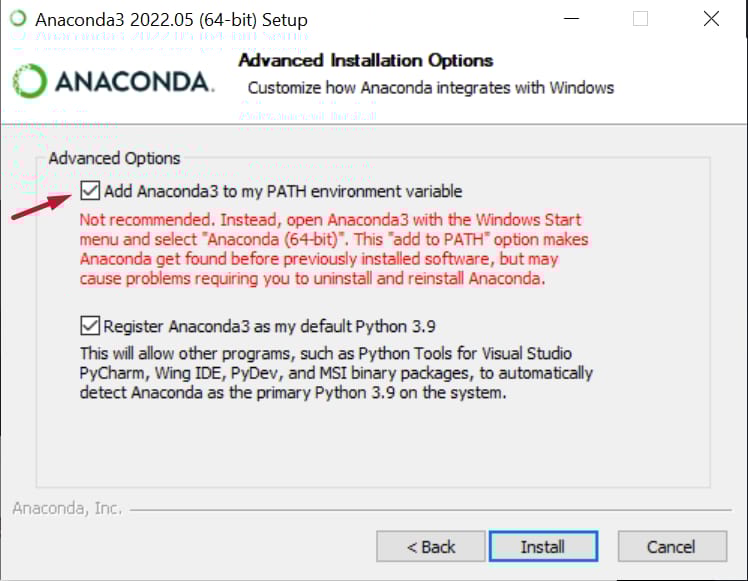
The download and installation should be straight forward, but there is an important step you have to do, and that is checking the box for adding Anaconda to your PATH environment variables.
Step 2. Install Git
Source: git-scm.com
Git is free and open source software for distributed version control.
No special requirements for the installation.
Step 3. Git clone the stable-diffusion-webui repo
Disclaimer: A restart might be needed in order for Anaconda/Git to work.
Source: github.com/AUTOMATIC1111/stable-diffusion-webui
Open your CMD, cd (how to) to the folder you'd like to clone the above repo to, and type "git clone https://github.com/AUTOMATIC1111/stable-diffusion-webui" in your CMD.
The cloning should not take long, as the files are not big.

Don't worry, the repo is virus-free. I mean, with 13.1k stars on GitHub it should very well be, but just to be completely sure, MalwareBytes goes into action.

You can close your CMD.
Step 4. Download the Stable Diffusion model
Source: huggingface.co/CompVis/stable-diffusion-v-1-4-original
You will have to create an account on HuggingFace before being able to download the model.
Once you've created the account, download the sd-v1-4.ckpt weight.

The file will be 4GB in size, so make sure you have enough space.
Again, with it's popularity we shouldn't even worry about viruses, but again, let's just be sure. MalwareBytes, what do you think?

Step 5. Add the Stable Diffusion model to the WebUI kit we cloned
Sounds hard? Well, it's not.
Simply go to where you cloned the repo in step 3, go to the following folder: stable-diffusion-webui -> models -> Stable-diffusion, and paste here the sd-v1-4.ckpt file we downloaded in step 4.

Step 6. Open the WebUI kit and have fun!
All you have to do now is to go to the main "stable-diffusion-webui" folder and open the WebUI kit by double clicking on webui-user.bat file.
When you do it for the first time, it will take a few minutes because the dependencies the kit requires need to be installed, after that the kit will load pretty fast.
Once the kit loads, it will provide you with an IP address.
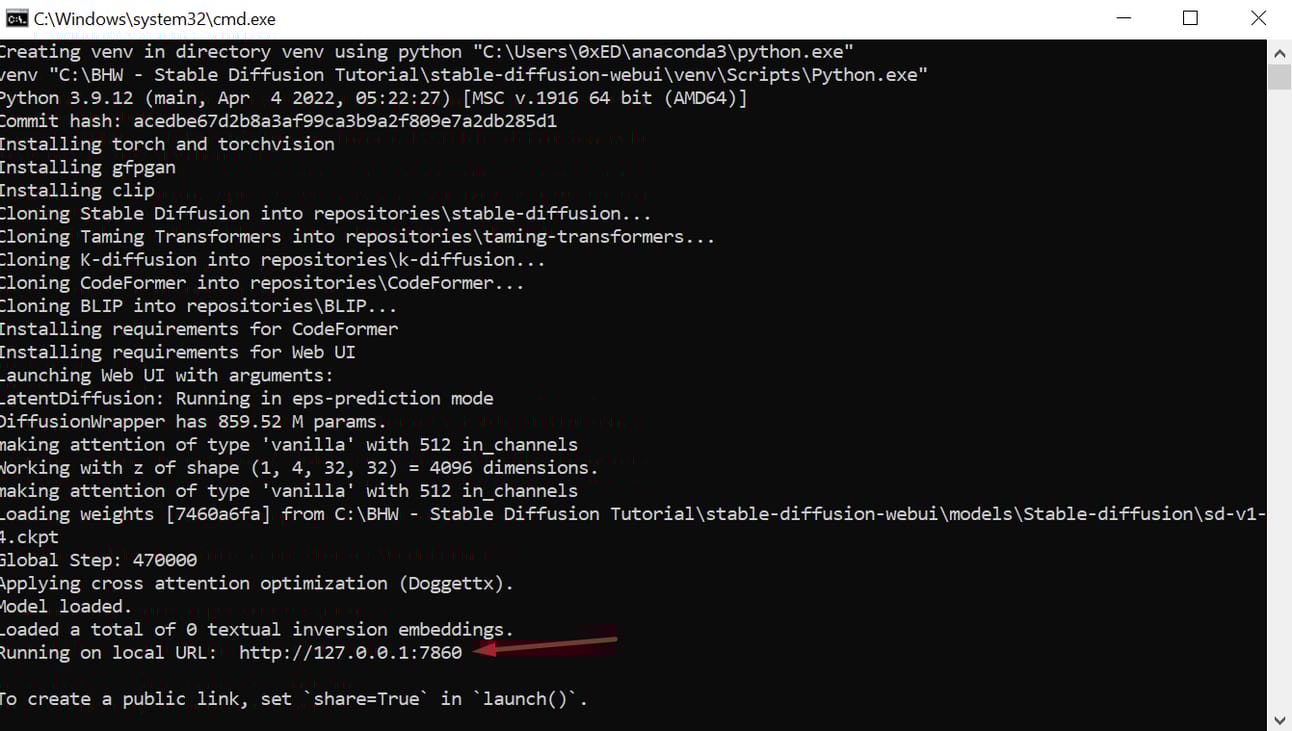
Simply copy that address and paste it in your browser.
That's it, you now have a full version of Stable Diffusion, right there on your computer, for you to use anytime you want, for FREE!

Won't go into everything you can do with the webUI kit, that's for you to try out on your own.
But, just to get your feet wet, write something in the "prompt" input area, then click the big orange "Generate button", magic will happen.
I hope this helps some of you have an easier start in the world of AI!
Happy generating!
VIP Tip 🎁
Maximize Your Cold Email ROI in 2024

Avoid sending mass cold emails from September through November. Major companies ramp up outreach during this period, crowding inboxes. Plus, with elections approaching, your messages may get lost in the noise. Instead, focus on highly personalized, low-volume campaigns during these months to maintain engagement and protect your sender reputation. Resume larger-scale efforts in December for optimal results.This exclusive insight, usually reserved for high-paying clients, could save you thousands in wasted ad spend. You're welcome!

Build $10K P/M Affiliate Empire
Key Steps:
Keyword Research
Used KeySearch and Mangools
Found 7 profitable, low-competition keywords
Website Setup
Purchased brandable domain
Used WordPress with Elegant Themes (Divi builder)
Created essential pages: Home, About, Contact, Blog
Content Creation
5,000-word informational piece on homepage
2,000-word buyer's guide
Five 2,000-word product reviews
Traffic Generation
Pinterest: Created 50+ pins
Reddit: Posted in 10+ relevant subreddits
Hired VA for scaling Reddit efforts
SEO Strategy
On-site optimization: Keywords, meta tags, internal linking
Off-site: Web 2.0 properties for initial backlinks
Email outreach for high-quality backlinks
Results:
First sale within 7 hours
Scaled to $50-$80 per day from direct traffic
Rankings improved from 100+ to top 10 for target keywords
Key Takeaways:
Combine SEO with direct traffic methods for quicker results
Focus on creating high-quality, relevant content
Use strategic outreach for building valuable backlinks
The Answer You've Been Waiting For
Focus on building quality backlinks, leveraging expired domains, and engaging in niche SEO to steadily grow your traffic.
Confidential Tip 🎁
Access US Google Results from Anywhere!
Want to see what your US competitors see? Here's a game-changing trick.
Tip: Use this URL trick to view US search results:
Add "&gl=us" to the end of any Google search URL. For example: "https://www.google.com/search?q=your+keyword&gl=us". This bypasses geo-restrictions, giving you instant access to US results without a VPN. You're welcome!
That’s it for today! ☀️
If you want to submit a section to the newsletter or tell us what you think about today’s issue, reply to this email 🐦
Thanks for spending part of Tech Agility Hub.
See you in a week