- Get smarter about Online Side Hustle Secrets
- Posts
- This passive Income is simpler than you think
This passive Income is simpler than you think
Google AdSense Revenue 📈- Winning Offers 🤑 - Skyrocket your outreach...

Hello Gem Seekers !
Welcome to the new Gem Seekers who have joined us since last Friday!
At the end of each week, Tech Agility Hub brings you a deep dive into the vast ocean of internet-based prospects. We unearth little-known opportunities and cutting-edge methods to enhance your revenue streams and work output. Whether you're seeking distinctive market ideas or expert guidance to revolutionize your secondary ventures, our weekly dispatch is your compass for navigating the digital frontier.
If you aren’t subscribed yet, join smart, curious, and hungry folks by subscribing here.
So, get ready to dive right in, and let’s see what catches your eye this week! ☕👀
Table of Contents
Burning Question: What's the Secret to Landing Your First SEO Clients?
Curious? Read on to discover the game-changing answer at the end of this newsletter!

Get your first Google AdSense Revenue 🤝💡
At Tech Agility Hub, I’m all about sharing the real, behind-the-scenes strategies that get results. If you're struggling to get your website approved by Google AdSense, I’ve got some exclusive tips for you. Over the last few months, I’ve successfully gotten six new sites approved, even though it’s become tougher since late 2022. Here’s how you can do the same—and yes, I’ll even touch on some black hat methods for those looking to push the envelope.
We’ve all noticed it—getting your site through AdSense approval isn’t as easy as it used to be. While I’ve got some long-standing sites making steady revenue ($12–$20/day), I’ve recently developed a system that’s helped me get new sites approved quickly.
Why it matters for your business: The faster your site gets approved, the quicker you can start monetizing and growing your revenue. So, here’s my step-by-step guide to ensure your site gets the green light from Google.
Saturated Requirement but Essentials
Pages
About US
Contact Us
Privacy Policy
Term of us
What’s new is GDPR page
NAVIGATION
Category
Menu
Footer
Tags
Links -Intern Extern
Based on my experience some of my websites got rejected because some button not working or drive visitor to the wrong destination.

Design and Customization
Logo
Featured Image
Pro Home Page
Costumizable Essentials Pages
Writing High Quality Content
The serious part is The content. Please understand that, when it comes to acting, you need to convince Google-AdSense that you’re a Real Blogger or Professional writer. maybe you are, who knows
Tool & Ways to get HQ content.
1) eBook ' avoid Trademarket
=> So find an EBook in the niche that I want to write about and make it look unique
2) Aged content. Recommended
3) CHAT GTP. Hard to get approved “ and I think you already know it”
4) Translation and put your own touchs. 50/50
5) DO IT Yourself, Yes, DO IT by Yourself so damn Hard no one wanna do it
=> But if you only need 1 account this is the best choice to get approved during 1 to 4 days. No rewrited content No copy past.
If you do this mistake they will keep send you message like this:

LET ME MAKE IT CLAIRE TO YOU ABOUT G-ADSENSE APPROVAL PROCESS
If this is your first time and your adsense account is FRESH it's gonna take from 2 days to 14 days to get approved. Usually in the last 3 years theBot who approved your website. But after the October 2022 Update, things get more serious, which means YES the bot will check you, but if your website takes more than 4 days and still not get approved, you should know thatyour website will be processed under human verification, and that’s what you should to avoid.
About Domain name, THE MORE AGED THE MORE BETTER
Like you read above, we need to get approved and not rejected so do not submit a young domain name, and based on my experience the youngest website who got approved was 1 month old.
So do not read this guide and go to namecheap or godaddy, buy domain name, apply these steps and wait for approval, NOOO, be patient and give your website some breath, after 1 month apply for adsense. ‘I’m talking here about newbie.
Website Speed
Let’s start with plugins
WPRocket
Perfmatters
Shortpixel's
OMGF Plugin ‘For Google Font’
Table Content
Section number 2 is all about Hosting
As you know when you submit your website to adsense, you copy a JS code on the header site, isn't?
But what if i told you that, this code not only control the content or visitor but also the performance of your site so You need hosting who is UP 99.99% all the time. Not shit hosting like BlueHost or hostinger,,,
Smart Moves
While you prepare your website for AdSense Create Google AdSense Account by a professional email address like contact@yoursite*com
You don’t have it? Or your cPanel can’t provide it!!?
It’s okay ZOHO have free plan for you , Just go to their price page and select free plan.

Sometimes I ask myself why bloggers didn’t use their professional email at Submission?
This move increases your chance to get approved sweetie.
Niche Stay away from it
Crypto “don’t ask me why”
Politique
Drugs
Black Market
Violence
Medicaments
Things That changed Since October 2024
Is all about high quality content plus Traffic ‘Aged Domain Name Preference
Structure : For each headline I put IMAGE 500*500 or 1000/1500
No one of your paragraph should be more than 300 words
4 Headline per article
Article should include 700 words or more.
Article number : 21 => 33 or more
when you submit you will keep posting, if you're lazy write it and schedule it we are professional blogger don't forget that.
VIP Tip 🎁
How to Lightning-Fast Backlink Indexing
Tired of waiting for Google to notice your backlinks? Here's a game-changing tip.Tip: Use Omega Indexer for rapid backlink indexing.
This premium tool uses advanced algorithms to get your links indexed in under 72 hours, with an 80-90% success rate. It's typically a paid service, but I'm sharing this insider secret with you for free. Watch your rankings soar!

Passive Income with "Laser Targeted" Traffic [Method + Sources]
At Tech Agility Hub, I know the question of making passive income online is one that crosses everyone’s mind more than once. But let’s be honest—there’s no magic formula to get rich overnight. However, I’m about to share a practical, results-driven method that worked for me, generating my first serious income online, and it's still my go-to strategy years later. Ready to dive in?
Think Beyond the Usual: The Key to Standing Out
The way you make money online will vary depending on your approach, interests, and creativity. The key to success is thinking outside the box. While I might talk about promoting a CPA offer or an affiliate program in the health niche, that doesn’t mean you have to follow the exact path. Choose your niche and use this targeted traffic strategy to grow your email list, build relationships, and monetize later. This flexibility is how you’ll stay ahead of the competition.
Paid Traffic: The Hidden Goldmine
When most people hear "paid traffic," they think of platforms like Google, Facebook, or Instagram. But that’s just scratching the surface. There are countless ad networks that offer laser-targeted traffic at a fraction of the cost, allowing you to drive visitors to your store, YouTube channel, CPA offers, or even build a monetizable email list.
Why it matters for your business: Paid traffic doesn’t have to break the bank, and with these overlooked ad networks, you can tap into high-quality traffic that converts, without fighting for visibility on overcrowded platforms.
Here is the simplest form I can explain it:
Find a Winning Offer + Create a Campaign + Send Laser Targeted Traffic + Scale Up & Repeat!
Now let's dive into the method.
Step 1- Pick Your Winning Offer
The first thing you need to do is to find an offer, and you need to find an offer that is already converting well. To do that, you need to look at affiliate networks or sources that give you access to affiliate programs. Let's take CPAGrip as an example here. It's a good network to start your journey with. After sign up, you need to check two below factors in the offer list page:
Net Performance
Net Conversion
In this network, they are written as below. (The name can be a little different in other networks):

Net Prf shows that how other affiliates are promoting this offer. If it's high, it means that the offer has been promote successfully by other affiliates so that's a good sign which you can take advantage of.
For example, below offer has a payout of $1.37 with 98% Net Prf and 18.20% Net CR. This is a very good sign for a offer which shows that from every five affiliates, one is promoting this offer successfully, so this shows that this is a very good offer for promoting.

Let's check out some other offers with high CR rate:

Also, by click on Net CR column, you will be able to sort offers by their conversion rate on the network. You can do the same to find good offers in other networks.
This is not the only factor you should consider when it comes to choosing a winning CPA offer, however, that's a powerful sign you can look for while searching for valuable affiliate programs and offers. Keep in mind that and offer with a higher CR rate is better than an offer with higher payout. You can make more with an offer that converts better compared to a low converting but high paying offer.
Now, I'm going to pick one of these offers with an easy-to-convert action (like pin/email submit) then we go to the next section. With all being said, I decided to pick the following offer:
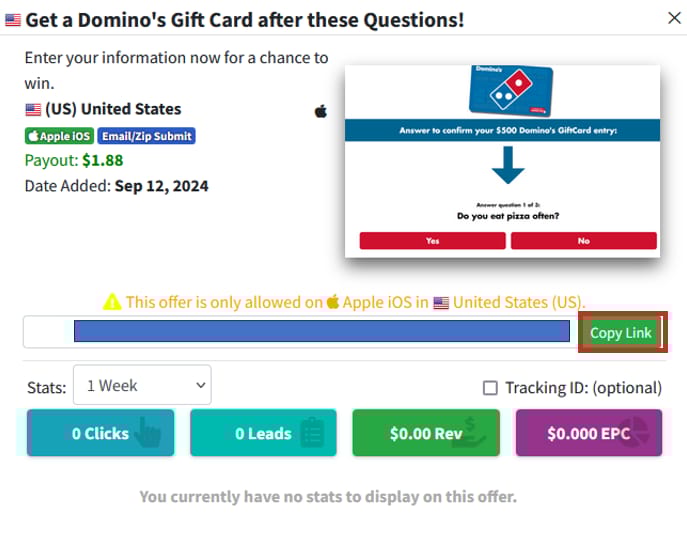
It's an easy-to-convert iOS offer with good payout $1.88 per conversion. It also targets US audience which typically has a higher CR rate for iOS offers. This means if you get only 100 conversion, you can make $188.00. You can buy targeted traffic for this offer under $50 (I'll explain in the next step), so you will be +$130 in profit.
When you picked your offer, simply click on "Copy Link" to get your affiliate link. Save it somewhere in your computer and go to the next step.
Step 2- Meet Your Paid Traffic Source!
As I've mentioned earlier, there are tons of ad networks that can send you highly targeted traffic. Not all of them have high quality traffic but I try to introduce you some good ones that I've personally worked with. For this guide, we are going to use Roller Ads which is a high quality push notification ad network, suitable for a wide range of affiliate offers.
The process of working with them is very simple: you provide them with your affiliate link, and they promote it using methods like push notifications or in-page push ads. If you are carious to know about push notifications, they are instant messages with announcements and sales offers delivered straight to people’s mobile phones or browsers. It's also called Push ads and they are highly clickable, provide great CTR (click-through rates), and deliver excellent results across almost all verticals.
Example of push ads on iOS mobile devices:

So when you are promoting your affiliate link through this marketing channel, your link will be landed in the mobile screen of your target audience; and yes, it's the best place to show them your offer. Also RollerAds is one of the best ad network that can send you high converting push traffic.
So, simply sign up with RollerAds as an advertiser (you are going to buy traffic for your offer, so you are the advertiser):
After click on sign-up, select "advertiser" then "Individual," then fill in your first and last name, your details, and, if you don’t have a Skype ID, toggle to Telegram and enter your Telegram username. Complete everything, click "Send," and you should be able to claim your account. You will also need to verify your email, but it’s very easy so I skip it here.
Once you’ve created your account, your dashboard will look like this:

The first thing you want to do is top up your balance. Click on "Balance" to fund your account.

You can use various methods like card, Bitcoin, USDT, crypto, Payoneer, PayPal, etc. The payment limits are between $50 and $11,000, which is very flexible and if you are using USDT, the minimum is $50. When you've fund your account, it's time to create your campaign.
Step 1: Create Your Campaign
Start by clicking "Create New Campaign" and selecting the "Push" format with "Smart CPC" to maximize your results. If you're new to campaign tracking, skip the postback URL setup for now.
Step 2: Choose Your Traffic Preset
Since we’re running a sweepstakes offer, choose the preset "US I Mobile I Sweepstakes" for optimal targeting. These presets are pre-optimized by RollerAds to deliver the best results for specific niches.
Step 3: Set Up Creatives
You have two options for creating your ad visuals:
Manual: For sweepstakes, search for relevant images using Google. You’ll need one icon (192x192) and one image (360x240).
Auto-generated: Ideal for software or utility offers (AI-generated creatives from RollerAds).
Choose a catchy title and description from your offer page, and you can even use AI to help generate this content.
Step 4: Geo Targeting & Quality Traffic
Select "United States" as the geo-target and choose the "Only Proxy" option to ensure high-quality traffic.
Step 5: Set Your Budget & Frequency
Daily budget: Set a minimum of $5.
Frequency: Limit your ad to appear 1-2 times per 24 hours to avoid burning through your budget too fast.
Devices: Only target mobile traffic by disabling desktop and tablet options.
Step 6: Launch Your Campaign
Once you review your settings, click "Start Campaign." Your ad will go live after approval, which usually takes less than 24 hours.
Optimization Process
Once your campaign is live and data starts rolling in, you can begin optimizing by adjusting browser versions, traffic zones, or creating whitelists for the best-performing areas. This process takes time, but it's essential for maximizing profitability.
The Answer You've Been Waiting For
Offer free, actionable advice on Reddit and social media. Prove your value first, then clients will naturally follow. Consistency and genuine helpfulness are key.
Confidential Tip 🎁
How to skyrocket your outreach?
Here's an insider secret most marketers don't know.
Tip: Use ReachOWL for safe, automated mass DMs on Facebook and Instagram.
This Chrome extension lets you run targeted DM campaigns, set daily limits, and A/B test messages. It's typically $49/month, but I'm sharing this game-changing tool with you for free. Start your 14-day trial now!
That’s it for today! ☀️
If you want to submit a section to the newsletter or tell us what you think about today’s issue, reply to this email 🐦
Thanks for spending part of Tech Agility Hub.
See you in a week — Abdelhak.